Hi,
Exporting a label project from the Web Report Designer fails with error -18 LL_ERR_PARAMETER) in List & Label 31. This is reproducible using the unmodified Angular Web Reporting Sample.
Steps to reproduce:
- Open the sample solution: C:\Program Files (x86)\combit\LL31\Samples\Microsoft .NET.NET 8\ASP.NET\Angular Web Reporting Sample
- Build and run (dotnet run)
- Open the Web Report Designer in the browser
- Create a new Label project
- Add any content (even just static text — no data binding needed)
- Click Export, choose any format (PDF, PNG, etc.)
- Export fails: “Execution failed”
Note: Exporting list/report projects from the same sample works fine. The issue is specific to label projects.
Debug log excerpt:
LlPrintSetOption(1, 26==LL_PRNOPT_COUNT_OF_ITEMS, 0) → -18 (Parameter error)
Stack trace from the debug log:
combit.Reporting.LlCore.LlPrintSetOption(Int32 option, Int32 value)
combit.Reporting.ListLabel.PrintLabelFromRelationalDataSourceNewMode(…)
combit.Reporting.ListLabel.AutoPrint(…)
It appears that PrintLabelFromRelationalDataSourceNewMode passes 0 to LL_PRNOPT_COUNT_OF_ITEMS for label projects, which is rejected as an
invalid parameter.
Environment:
- List & Label 31 (v31.1.313)
- .NET 8.0 / Windows 11
- Angular Web Reporting Sample (unmodified)
Is this a known issue? Is there a service pack or workaround available?
Thanks
Hey Simon,
Great to see you here in the community - welcome.
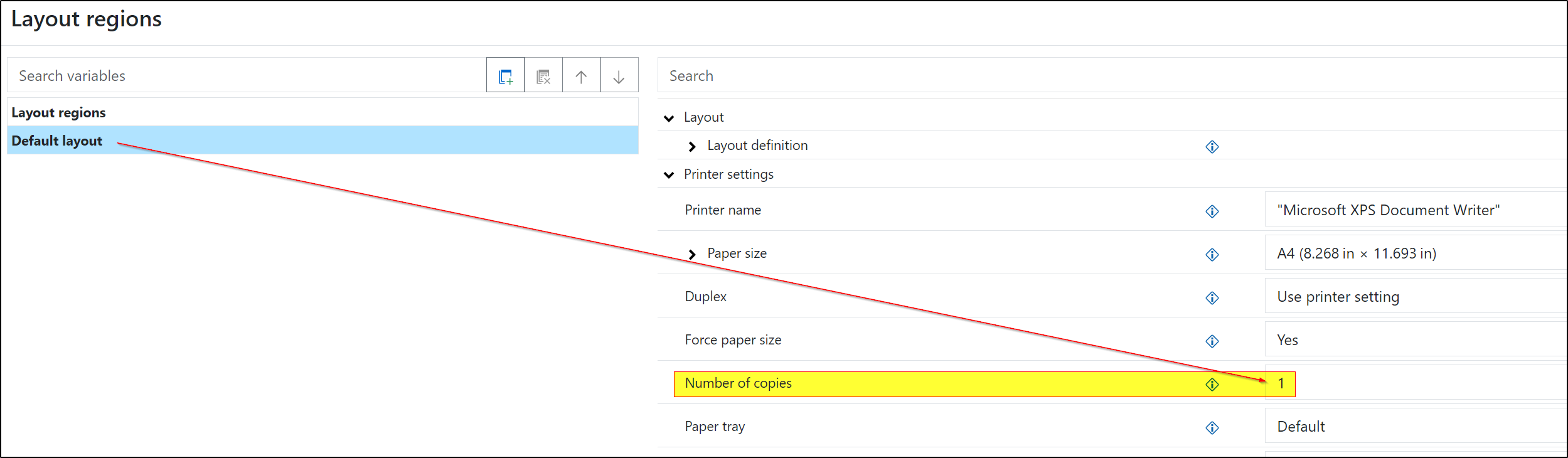
Can you please check what is stored in your new label for the property Layout regions > Number of copies?
I’m afraid it should be at least “1” - otherwise, no meaningful output can be produced for labels. Perhaps the default for the default printer set on your system - for me it’s “Microsoft XPS Document Writer” - is unsuitable?
Hi Oliver,
Thanks for this quick response! Number of Copies was set to “1”. I’ve tried a few different default printers e.g., OneNote for Windows 10, Microsoft XPS Document Writer, Microsoft Print to PDF ect but I get the same result. I don’t have a real printer connected to this machine currently so I can’t try that.
Also, I just noticed that is an existing label in the sample application, and the same error happens for it too.
Are you able to reproduce the issue?
Interesting… the default label works perfectly for me as well. It also works in another MVC ASP.NET example on my end. However, I already have the latest prerelease Service Pack (version 31.2) installed because of something else - perhaps it already includes an adjustment. You might want to try that too, just to be safe. Otherwise, support will probably need to take a closer look.
Hi Oliver,
Thanks for confirming it works for you on SP 31.2. I’ll try upgrading but the latest version on NuGet for combit.ListLabel31 and combit.ListLabel31.Web is 31.1.0. Where can I download the 31.2 prerelease?
Thanks,
Simon
P.S. It seems there is a 31.2 version on your feed at nuget.combit.net but it is only the CrossPlatform packages. Is their a Windows SP 31.2 available as a NuGet package, or a support portal?
You will find the lastest prerelease service pack in general within your combit account for download.
The sample works with the classic List & Label version for Windows. You are mentioning the new cross platform version. I think the packages are updated in another way there - found that:
New NuGet server for LLCP packages
As I remember the installed samples are working with hard references - the assemblies directly from installation directory are used - not the NuGet packages.