There is a formula Hyperlink$ but that one works in HTML.
I would like to display a “www.mywebsitesample.com in a report so you can start the web site from the preview and when exported to pdf, word excel it does allow to click on it.
Is that possible?
Search the help for hyper and link but did not find something.
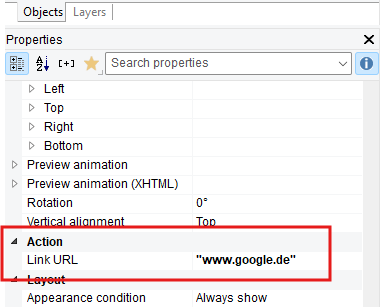
This makes the object clickable in the preview to open the link. For the exports please note that this would be currently only available for a PDF and (for text cells) for an Excel export. Additional formats (like Word) would be a new feature, which you can submit as a proposal (and a new idea for voting) in the Idea Place category.
Did look in the Designer Manual. I searched for Hyperlink and Link. But did not searched for URl. Checked again yes there are references to it but all Samples give a link to the Link target but only for a file on the local drive …
Not needed to have more than pdf en the viewer at the moment